AI & Commerce
AI Traffic in GA4 for Shopify: The Attribution Setup
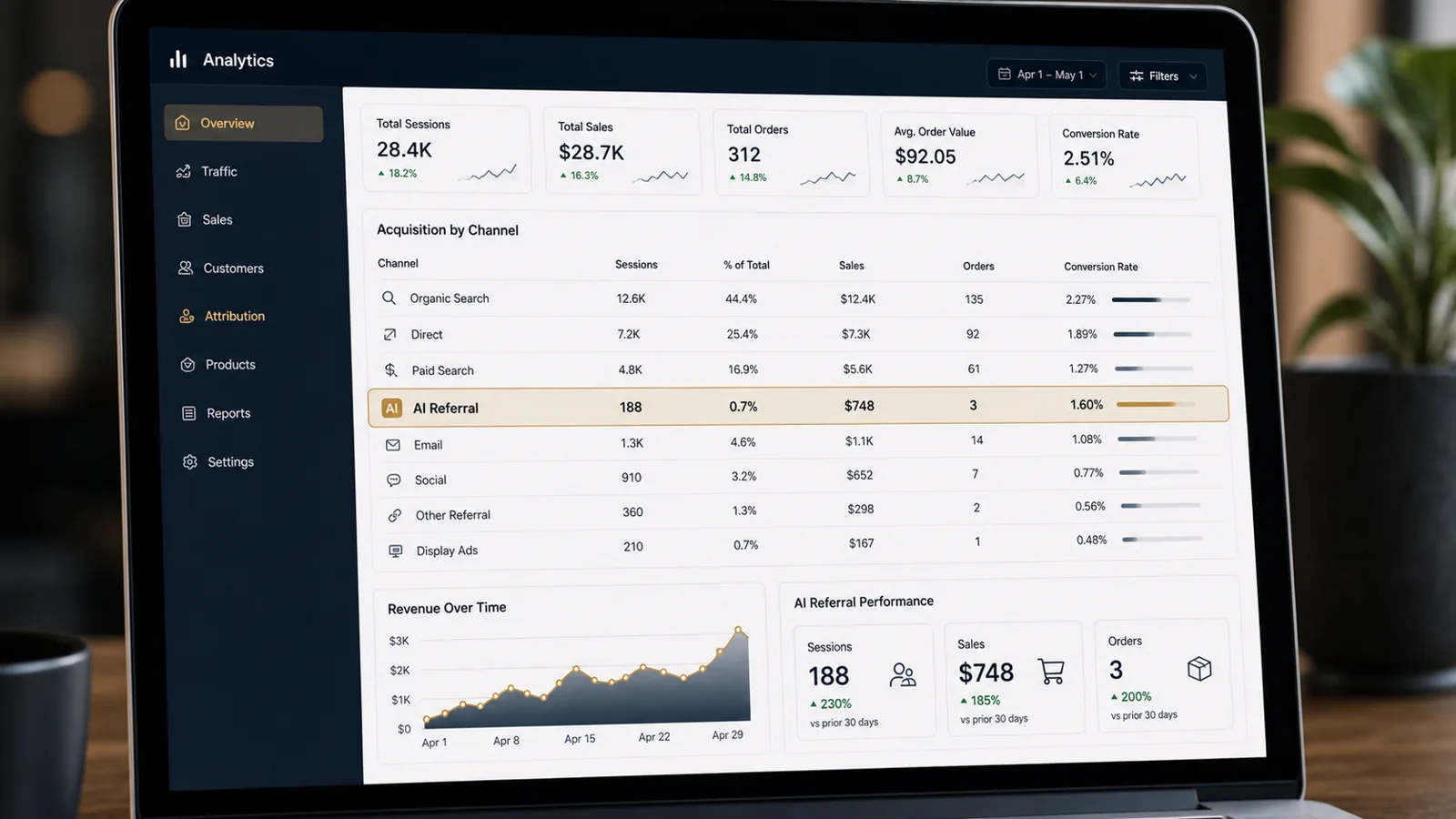
ChatGPT, Perplexity, Gemini, Claude, and Copilot can send shoppers to a Shopify store. GA4 can split those visits across Referral, Organic Search, Direct, or a custom channel. This page shows how to group the traffic, check the source, and prove whether it reaches product pages, carts, checkout, and revenue.
Reviewed June 12, 2026 against current Google Analytics 4 channel-group and traffic-source documentation.
Quick Answer
In GA4, do not stop at the default channel summary. Create or validate an AI assistant channel group, check session source / medium, and tie the traffic to Shopify events: product view, add to cart, checkout start, purchase, revenue, and average order value. If the channel shows visits but no store movement, the next problem is the product page, offer, cart, checkout, or measurement setup.
Check next
Before you buy more traffic, prove where the visits stop.
Why this article matters: A Shopify summary can show AI sessions while the business gets no orders. The work is to separate three problems: the AI channel is mislabeled, the store tracking is broken, or shoppers arrive and drop before purchase.
- Find the AI source in GA4 instead of trusting the default channel label.
- Check whether those visits view products, add to cart, start checkout, and buy.
- Fix the summary before you make budget decisions from it.
Official docs checked
- Google Analytics default channel groups define an AI Assistants channel for AI assistant traffic and classify Google AI Overviews / AI Mode under Organic Search.
- Google Analytics 4 custom channel groups let teams build rule-based categories, including an AI assistants example, using traffic fields such as source and medium.
- Default channels are system-defined and can evolve. Use custom channel groups, session source / medium, and Shopify event checks when the business decision needs more control.
The AI traffic setup checklist for Shopify
Key takeaways
- AI sessions do not matter by themselves. They matter when they reach products, carts, checkout, and purchases.
- Use a custom AI assistant channel group when default tracking does not give you a clean decision view.
- Use session source / medium to audit where the visit came from. Use product, cart, checkout, purchase, and revenue events to audit what happened next.
- Do not tag internal links with UTMs. That can break the original source and make the summary look cleaner while the truth gets worse.
- If AI traffic reaches the store but does not move carts, checkout, or purchases, fix the product page and checkout experience before chasing more traffic.
Why GA4 can split AI traffic
GA4 assigns traffic from campaign parameters, referrer information, and channel-group rules. AI assistant clicks do not always arrive with the same label. One visit can appear as referral, another can appear under organic search, and another can lose the referrer completely.
That is why the first task is not a chart. The first task is a source check. Open Traffic acquisition, switch to session source / medium, and list the values that mention ChatGPT, OpenAI, Perplexity, Gemini, Claude, Copilot, Microsoft, or other assistant surfaces you expect.
Once the source values are visible, test whether those visits move through Shopify events. If the summary looks clean but product views, carts, checkout starts, or purchases do not move, the summary did not find growth. It found a place to inspect.
Build the AI assistant channel
First, check whether GA4's default AI Assistants channel already separates the traffic in your property. If it does, keep it as the clean management view and still check source / medium for detail.
If the default view is too broad or misses values you see in your account, build a custom channel group. In GA4, go to Admin, then Channel groups. Create a custom group and add an AI assistant channel using the source values that actually appear in your property.
Do not copy a regex from a blog post and assume it is complete. Export recent source / medium values, group the values you can prove, and leave questionable traffic outside the rule until you confirm it.
Rule order matters. GA4 uses the first matching rule in a channel group. Put the AI assistant rule where it will not be swallowed by a broader referral or organic rule.
Use source / medium correctly
| GA4 field | What it answers | Use it for | Do not use it for |
|---|---|---|---|
| Session source / medium | Where this visit session came from. | AI assistant traffic marketing services and Shopify session comparison. | Lifetime customer source claims. |
| First user source / medium | Where the user was first acquired. | Longer customer acquisition analysis. | Deciding why today's checkout session converted. |
| Event source / medium | Campaign context attached to an event. | Checking whether the visit reached product, cart, checkout, and purchase events. | Replacing session-level channel analysis. |
| Custom channel group | A tracking view that groups messy sources into one channel. | A simple owner summary after the source values have been checked. | Recovering referrer or campaign data that was never captured. |
Tie the channel to Shopify events
The channel summary tells you where the visit came from. Shopify events tell you whether the visit became a buyer. Compare AI sessions against:
- Landing page: guide, collection, product page, comparison, or proof page.
- Product page views and product detail quality.
- Add-to-cart and cart-to-checkout movement.
- Checkout start and purchase events.
- Revenue and average order value by channel.
If sessions exist but product-page movement does not, the landing page is not sending shoppers toward products. If product pages get visits but carts do not move, inspect price, proof, shipping, fit, and offer. If checkout starts but purchases do not, inspect payment, shipping surprise, trust, and abandonment.
UTM rules that do not corrupt attribution
Use UTMs on external links you control: paid campaigns, newsletters, creator links, partner placements, PR links, and owned social. Those links need campaign parameters because the click starts outside the site.
Do not use UTMs on internal links from a guide to a Shopify product page. Internal UTMs can overwrite the original source and make AI traffic look like your own blog or content campaign. Keep the original session source intact, then judge whether the product page and checkout did their job.
Common attribution mistakes that destroy AI channel data
Using a universal AI regex without checking your own source values. The values in your GA4 property decide the rule.
Putting the custom AI assistant rule below broader channel rules. If a broad rule matches first, the AI channel stays hidden.
Tracking only sessions. Sessions are not revenue. For Shopify, the proof chain is session, product view, add to cart, checkout start, purchase, revenue, and average order value.
Calling the channel a win before carts, checkout, and purchases move. AI visibility without orders means shoppers looked. It does not mean the store sold.
5-Platform comparison: how each AI treats Shopify
A quick reference across ChatGPT, Perplexity, Gemini, Claude, and Grok. For the deeper comparison of what each platform can cite, send, or measure for ecommerce, see the AI Platforms for Ecommerce comparison.
| Platform | Source mechanism | What it rewards | Traffic profile |
|---|---|---|---|
| ChatGPT | Behavior varies by product, mode, query, locale, account state, and date | Use current provider documentation and the observed output; do not infer universal ranking factors | Often visible in source numbers. Compare sessions against product views, carts, orders, and revenue before calling it qualified. |
| Perplexity | Behavior varies by product, mode, query, locale, account state, and date | Use current provider documentation and the observed output; do not infer universal ranking factors | Often easier to inspect because citations are explicit. Check landing pages and revenue events, not sessions alone. |
| Gemini | Behavior varies by product, mode, query, locale, account state, and date | Use current provider documentation and the observed output; do not infer universal ranking factors | Patterns can blend with Google search and Shopping surfaces. Use source / medium plus landing-page review. |
| Claude | Behavior varies by product, mode, query, locale, account state, and date | Use current provider documentation and the observed output; do not infer universal ranking factors | Lower public referral volume for many stores. Treat as citation and trust signal until sessions and purchases are visible. |
| Grok | Behavior varies by product, mode, query, locale, account state, and date | Use current provider documentation and the observed output; do not infer universal ranking factors | Measure actual referral and qualified-outcome evidence for the site and category. |
Common Questions
Common questions
Why does AI traffic show up as referral, organic, or direct in GA4?
GA4 classifies traffic by source, medium, channel group, and scope. AI assistant clicks can appear as referral, organic search, or direct depending on the source, the browser, and whether the referrer or campaign parameters survive the click. Use GA4's AI assistant custom-channel guidance, then validate with session source / medium and landing-page behavior.
What should I include in an AI assistant channel group?
Use Google's current custom channel group guidance as the base, then test the source values in your own Traffic acquisition summary. Common sources include ChatGPT, OpenAI, Gemini, Microsoft Copilot, Claude, and Perplexity. Put the rule in the correct order, because GA4 applies the first matching channel rule.
Can I recover historical AI traffic that was misattributed?
Not perfectly. GA4 custom channel groups can be applied retroactively to existing tracking fields, but they cannot recover referrer or campaign data that was never captured. You can regroup known source and medium values, then review historical landing-page patterns as an estimate.
Should Shopify stores build a separate GA4 property for AI traffic?
Usually no. Keep one property, add an AI assistant channel group or summary view, and compare AI sessions against Shopify purchases, revenue, product pages, cart starts, and checkout completion. A separate property makes one buyer journey harder to inspect.
How do I know if my AI traffic tracking is accurate?
Cross-check three things: the channel group, session source / medium, and Shopify revenue events. If sessions appear but purchase events do not, inspect the product page, cart, checkout, and event setup before blaming the channel rule. If purchase events appear but source / medium is unstable, fix the tracking setup before increasing spend.
Should I tag internal Shopify links with UTMs?
No. Do not add UTMs to internal links from blog pages to product pages. Internal UTMs can overwrite the original session source. Use UTMs on external campaigns and partner links you control, then keep the original source intact as the shopper moves through the store.
What metrics matter for AI traffic on Shopify?
Start with sessions, engaged sessions, product page views, add-to-cart, checkout starts, purchases, revenue, and average order value. Then compare those against organic search and paid search. Do not celebrate AI sessions until they reach product pages, carts, checkout, and purchases.
Shopify attribution marketing services
Check the AI traffic before you change the budget.
Growth system plan of GA4 source data, Shopify revenue events, landing pages, cart movement, checkout friction, and the next fix.
See marketing consulting